
PowerShell Script: Mass-Mailer
Today a colleague asked me to write a script to send out a email to a large group of people but have the phrase “Dear <person’s name”>” in the beginning of email body.
I quickly wrote this script. Here are the steps you need to take before executing it:
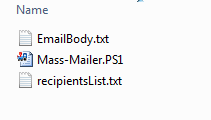
1. Zip and place the Mass-Mailer folder somewhere on your computer. There are 3 files in the folder:
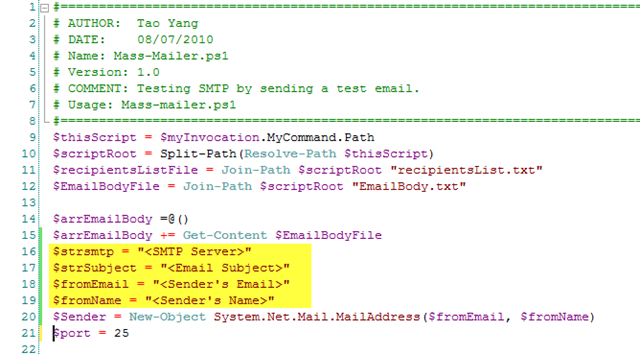
2. in Mass-Mailer.ps1 file, modify the highlighted section ( and remove the “<” and “>”brackets):
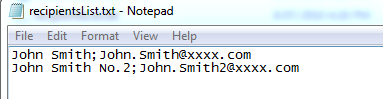
3. Open recipientsList.txt and enter recipients name and emails, one recipient per line with format Name;Email (i.e. John Smith;John.Smith@xxx.com)
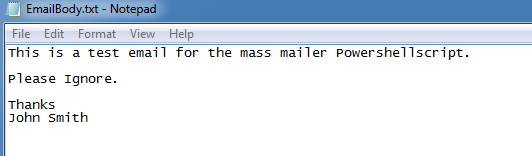
4. Write the email in EmailBody.txt
5. Execute Mass-Mailer.PS1
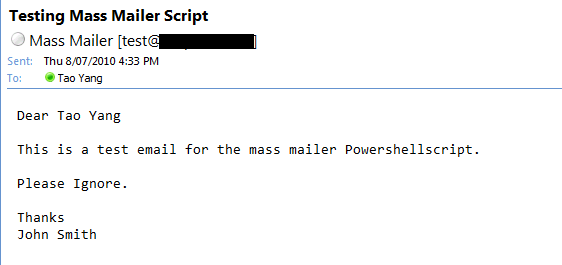
The email is sent to each recipient individually. it looks like:
Tags: Emails, Powershell, SMTP
- Subscribe via RSS
Featured
Archives
- May 2013 (2)
- April 2013 (5)
- March 2013 (7)
- February 2013 (1)
- January 2013 (3)
- December 2012 (2)
- November 2012 (2)
- October 2012 (4)
- September 2012 (4)
- August 2012 (6)
- July 2012 (1)
- June 2012 (1)
- May 2012 (4)
- April 2012 (4)
- March 2012 (4)
- February 2012 (5)
- January 2012 (9)
- December 2011 (1)
- November 2011 (1)
- October 2011 (5)
- September 2011 (1)
- August 2011 (4)
- July 2011 (2)
- June 2011 (3)
- May 2011 (7)
- April 2011 (2)
- March 2011 (1)
- February 2011 (2)
- January 2011 (3)
- November 2010 (3)
- September 2010 (3)
- August 2010 (3)
- July 2010 (9)
- June 2010 (3)
Categories
- Active Directory (1)
- DNS (1)
- Hyper-V (4)
- Microsoft Exchange (1)
- Others (9)
- PowerShell (44)
- SC Orchestrator (1)
- SCCM (31)
- SCDPM (1)
- SCOM (55)
- SCSM (2)
- SCVMM (3)
- SQL Server (1)
- VBScript (1)
- Windows (5)
Tags
70-400 Alerts Console Crash Daylight Saving Email Notifications Emails Exams Exchange 2007 Exchange 2010 Failover Management Servers Featured Hardware Inventory Health Check Hyper-V Inventory Management Pack MOM Morning Check MP Authoring NTFS Permission Others Powershell Powershell Remoting Primary Management Server remote execution policy SCCM SCCM 2012 SCCM Reports SCOM SCOM agent assignments SCOM Management Pack SCOM Migration SCOM Notifications SCOM Reporting SCVMM Secondary Site SMTP SQL Stopping MOM Agents TMG URL Encoding VBScript Web Console Windows Windows Scheduled TasksRecommended Blogs
Recommended Sites
Recent Comments
- Tyson on I’m Now a Microsoft Certified Solutions Expert (MCSE): Private Cloud
- Blake on OpsMgr Self Maintenance Management Pack
- Tao Yang on OpsMgr Self Maintenance Management Pack
- Blake on OpsMgr Self Maintenance Management Pack
- itbl0badmin on PowerShell Script To Enable SCOM Agent Proxy in a More Efficient Way
3 Comments
Thanks, this is almost what I am looking for. I have to send email to approx 5000 people with an attachment.
My question is:
1) how to add an attachment
2) what is this error
New-Object : Exception calling “.ctor” with “2″ argument(s): “The parameter ‘address’ cannot be an empty string.
Parameter name: address”
At \\server\home$\user\Mass-Mailer\Mass-Mailer.PS1:44 char:28
+ $objRecipient = New-Object <<<< System.Net.Mail.MailAddress($strEmail, $strName)
+ CategoryInfo : InvalidOperation: (:) [New-Object], MethodInvocationException
+ FullyQualifiedErrorId : ConstructorInvokedThrowException,Microsoft.PowerShell.Commands.NewObjectCommand
Exception calling "Add" with "1" argument(s): "Value cannot be null.
Parameter name: item"
At \\server\home$\user\Mass-Mailer\Mass-Mailer.PS1:48 char:21
+ $MailMessage.To.add <<<< ($objRecipient)
+ CategoryInfo : NotSpecified: (:) [], MethodInvocationException
+ FullyQualifiedErrorId : DotNetMethodException
Exception calling "Send" with "1" argument(s): "A recipient must be specified."
At \\server\home$\user\Mass-Mailer\Mass-Mailer.PS1:50 char:18
+ $SMTPClient.Send <<<< ($MailMessage)
+ CategoryInfo : NotSpecified: (:) [], MethodInvocationException
+ FullyQualifiedErrorId : DotNetMethodException
Remove-Variable : Cannot find a variable with name 'objRecipient'.
At \\server\home$\user\Mass-Mailer\Mass-Mailer.PS1:51 char:17
+ Remove-Variable <<<< objRecipient
+ CategoryInfo : ObjectNotFound: (objRecipient:String) [Remove-Variable], ItemNotFoundException
+ FullyQualifiedErrorId : VariableNotFound,Microsoft.PowerShell.Commands.RemoveVariableCommand
How does your recipientsList.txt look like?
Hi, I am very sorry for the late respons, lot on my mind.
The recipientslist I do not remember anymore.
For the attachment to sent I used this line:
$MailMessage.Attachments.Add(“\\Server\Data\Paul\Mailing_info.doc”)
Thank you for your comment.