


PowerShell Functions: Get IPV4 Network Start and End Address
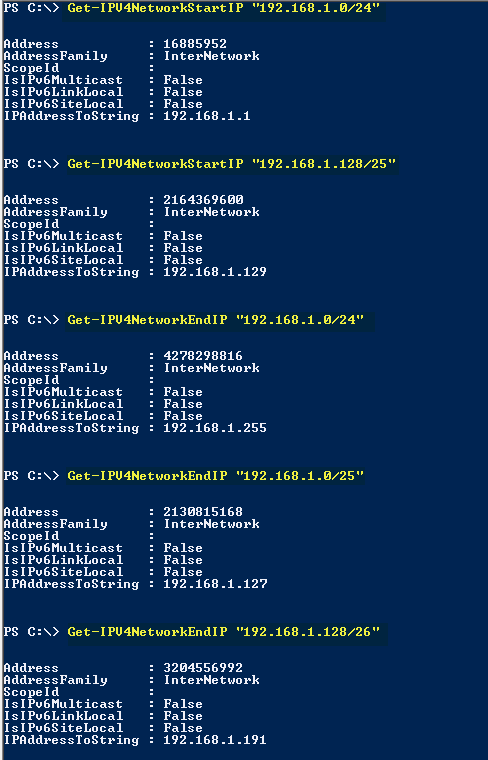
I wrote 2 PowerShell functions today: Get-IPV4NetworkStartIP and Get-IPV4NetworkEndIP. Input: Network IP address in CIDR notation Format Output: The start or end IP (System.Net.IPAddress object). Get-IPV4NetworkStartIP:
Function Get-IPV4NetworkStartIP ($strNetwork)
{
$StrNetworkAddress = ($strNetwork.split("/"))[0]
$NetworkIP = ([System.Net.IPAddress]$StrNetworkAddress).GetAddressBytes()
[Array]::Reverse($NetworkIP)
$NetworkIP = ([System.Net.IPAddress]($NetworkIP -join ".")).Address
$StartIP = $NetworkIP +1
#Convert To Double
If (($StartIP.Gettype()).Name -ine "double")
{
$StartIP = [Convert]::ToDouble($StartIP)
}
$StartIP = [System.Net.IPAddress]$StartIP
Return $StartIP
}
Get-IPV4NetworkEndIP:
Function Get-IPV4NetworkEndIP ($strNetwork)
{
$StrNetworkAddress = ($strNetwork.split("/"))[0]
[int]$NetworkLength = ($strNetwork.split("/"))[1]
$IPLength = 32-$NetworkLength
$NumberOfIPs = ([System.Math]::Pow(2, $IPLength)) -1
$NetworkIP = ([System.Net.IPAddress]$StrNetworkAddress).GetAddressBytes()
[Array]::Reverse($NetworkIP)
$NetworkIP = ([System.Net.IPAddress]($NetworkIP -join ".")).Address
$EndIP = $NetworkIP + $NumberOfIPs
If (($EndIP.Gettype()).Name -ine "double")
{
$EndIP = [Convert]::ToDouble($EndIP)
}
$EndIP = [System.Net.IPAddress]$EndIP
Return $EndIP
}
Usage:
- Get-IPV4NetworkStartIP “192.168.1.0/24”
- Get-IPV4NetworkEndIP “192.168.1.0/24”
Examples:
Leave a comment